İçeriğe atla
Blueprint Outline ilanı için 1. medya
0 yorum

Açıklama

# BlueprintOutline - Product Description (EN)

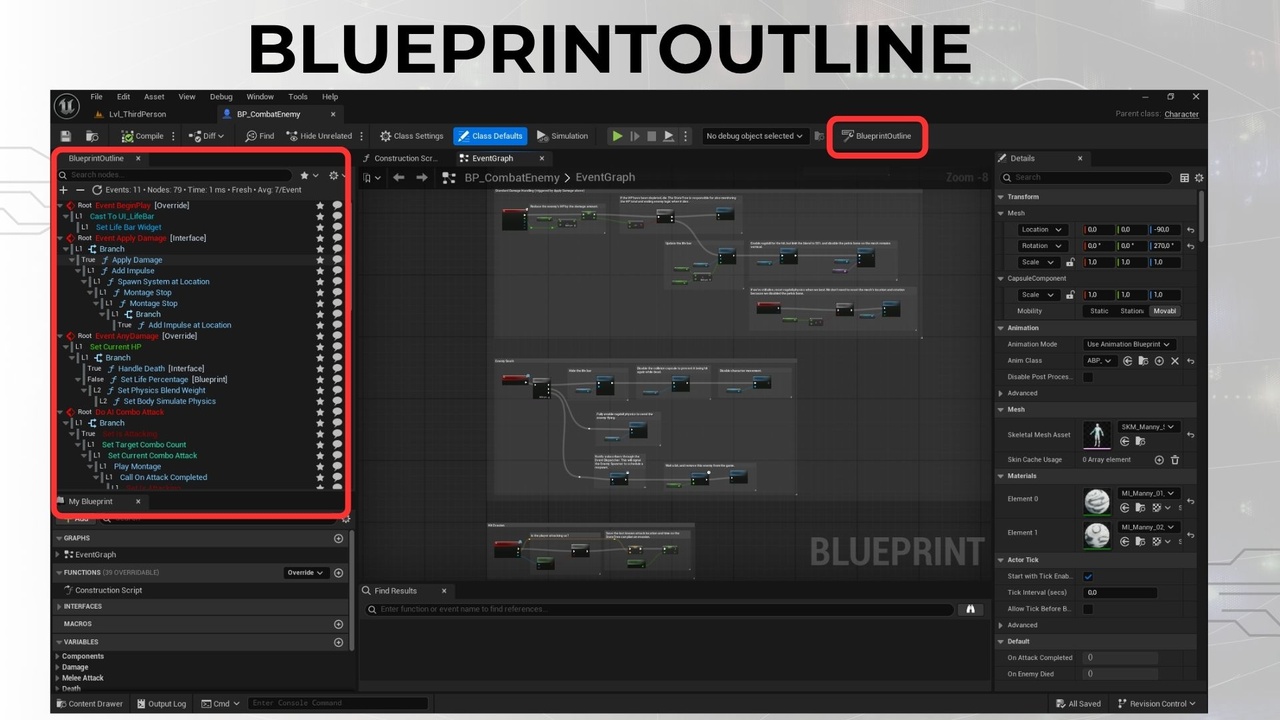
BlueprintOutline is an editor-only plugin for Unreal Engine 5.3–5.8 that visualizes Blueprint logic as an interactive tree view. It simplifies complex graphs by auto-expanding Macros and Collapsed Graphs, allowing developers to double-click any node and instantly jump to the corresponding Blueprint location.

Designed for speed and clarity, this tool improves Blueprint navigation, reduces debugging time, and enhances project comprehension—especially in large, nested systems.

## Currently Supports:

- Tree-based navigation across Events, Functions, Macros, Branches, Sequences

- Jump-to-node functionality - Double-click any tree item to navigate to the node in the Blueprint editor

- Dependency Explorer (v1.4.6) - Inspect the data-flow & reference graph around any node: Fed by (input expressions), Feeds into (downstream consumers), Calls, Overrides, Interfaces, plus cross-references (Written/Read/Referenced/Called by). Docked next to Compiler Results; single-click to preview, double-click to navigate or open the asset

- Human-readable Blueprint Documentation - Convert a Blueprint into clean, K2-noise-free text with inline pin values (e.g. `Duration = 3.0`); copy or export as Plain Text (.txt) / Markdown (.md)

- About & feedback panel (v1.4.6) - Info button showing version, release notes, copyable contact info, and a one-click "Copy all text" button (handy for translation)

- Node Renaming - Rename Custom Event nodes directly from the outline (context menu)

- Node Comments - Add/edit comments on nodes using the native Blueprint comment bubble

- Bookmark System - Bookmark important nodes for quick access across Blueprints

- Advanced Search & Filters - Real-time search with multiple filter options:

  - Exec Only (execution nodes only)

  - Show/Hide Branch/Sequence nodes

  - Show/Hide Latent nodes

  - Show/Hide Function Calls

  - Show/Hide Variable Get/Set

  - Show/Hide Custom Events

  - Show/Hide Pure Nodes

  - Show/Hide Event Dispatchers

- Keyboard Shortcuts:

  - `Ctrl+F`: Focus search box

  - `Ctrl+R`: Refresh outline

  - `Ctrl+E`: Expand all items

  - `Ctrl+Shift+E`: Collapse all items

  - `Ctrl+A`: Select all items in tree

  - `Ctrl+C`: Copy entire tree structure to clipboard

  - `Esc`: Clear search

- Full localization (EN/TR)

- Editor-only operation (no runtime load)

- Color-coded nodes for easy identification

- Smart Flow Lanes – Subtle lane overlay that highlights Branch True/False and Sequence/Switch paths with contextual labels

- Editor Selection Sync – Selecting a node in the Blueprint graph highlights it in the outline automatically

- Auto-refresh when Blueprints are opened or recompiled

- Branch & Sequence Support - Full support for Branch nodes (True/False paths) and Sequence nodes

- Async Build System - Non-blocking build for large Blueprints (1000+ nodes)

- Caching System - Per-Blueprint caching for instant subsequent opens

## In Development:

- Graph wire coloring to mirror Smart Flow Lane information

- Support for additional graph types (AnimBlueprints, Material Graphs)

## Key Benefits:

- Saves 50%+ time in large or messy Blueprints

- Compatible with UE 5.3.x through 5.8.x

- Lightweight – BP Editor-only, no runtime overhead

- No setup required – Works immediately after installation

- Multi-Editor Support – Each Blueprint Editor window gets its own panel

This plugin is lightweight, requires no additional setup, and can be accessed via `Window → BlueprintOutline` or automatically appears when opening Blueprints in the editor.

---

What does it do? BlueprintOutline is a visual assistant tool for Unreal Engine. It helps you view complex Blueprint logic as a clean, navigable execution tree, making it easier to understand, organize, and debug. New in 1.4.6, the built-in Dependency Explorer reveals how any node connects to the rest of your logic — what feeds it, what it feeds, what it calls, and where it's referenced — without leaving the Blueprint Editor.

Why is it needed? In large Blueprint graphs, following execution flow is difficult and time-consuming. This plugin shows the entire logic in a tree-view panel. Double-clicking a node instantly takes you to that part of the Blueprint. Macros and Collapsed Graphs are expanded automatically.

Who is it for?

- Game developers working in Unreal Engine 5

- Technical designers

- Indie teams and non-coders using Blueprints

---

## Support & Community

- Reddit Community: https://www.reddit.com/r/BlueprintOutline/ - Join our community for discussions, questions, and support

- Email Support: [email protected]

- Documentation: https://mchtmzffr.github.io/blueprint-outline/

- User guide (in plugin): `Documentation/BlueprintOutline_UserGuide_TR_EN.docx`

- User guide (online): https://docs.google.com/document/d/1fsdCR7YVo-pAa84UjqE1MNGN8E3viBLM/edit?usp=sharing&ouid=115894668752410085817&rtpof=true&sd=true

İçerdiği biçimler

Ek dosyalar